The Ten-Second Hello: Why Your Bio Page Needs a Voice Before It Needs Another Link
Most bio pages greet people with a logo, a name, and a stack of links that all say “pick me.” That works fine if you're a coupon code. If you're a creator selling a course, booking clients, or filling seats for a live event, it's a little cold. A ten-second voice note can warm up the whole page before someone reads a single button.
The idea is simple: put a short, optional audio greeting near the top of your bio page, above the link stack. Not a podcast trailer. Not a theme song. Just you, sounding like a human, telling visitors what they're in the right place for.
Why a voice note earns its spot
Text is great at details. Voice is better at trust. When someone hears a real person say “Hey, I'm Maya — I help freelance designers raise their rates without losing clients,” they get tone, pace, and personality in a way a headline can't deliver. That matters most when the next step is a bigger commitment: buying a course, booking a service, or showing up to an event.
It also helps you stand out in a feed full of identical link pages. A voice note says, “There's a person behind this bio.” That's a useful signal when someone is deciding whether to tap, reply, or bounce.
Keep it short, optional, and quiet
Three rules keep this from becoming the thing visitors hate:
- No autoplay. Ever. Let people choose to press play.
- Ten seconds, give or take. Long enough to sound human, short enough to respect a thumb hovering over the back button.
- Optional by design. The page should work perfectly if someone never touches the player.
Treat the voice note like a friendly greeter, not a gate. It should sit below your name and one-line description, and above your first link. A simple label works better than a mystery icon: “Hear a 10-second hello from me.”
The ten-second script that doesn't sound scripted
You don't need a broadcast voice. You need a clear sentence and a little energy. Try this skeleton:
- Greeting: “Hey, it's Jordan.”
- Who you help: “I teach new photographers how to book their first five paying clients.”
- What to do next: “Start with the free pricing guide below.”
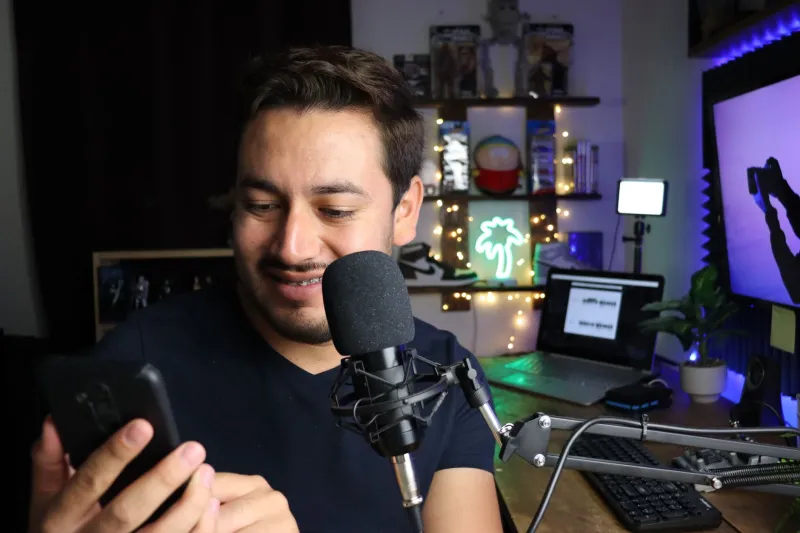
That's about 25 to 30 words. Read it out loud twice, then record on your phone in a quiet room. A $20 lapel mic is nice, but a closet full of sweaters and a phone voice memo can sound surprisingly good. Skip the music bed. Skip the “welcome to my page” throat-clearing. Get to the point.
A few sample openings:
- Course creator: “Hi, I'm Lena. I turn messy Canva files into clean brand kits, and my new course walks you through it step by step.”
- Service provider: “Hey, I'm Marcus. I build Shopify email flows for small brands — if you're losing carts, start with the audit link.”
- Event host: “What's up, it's Priya. I'm hosting the live creator meetup in Austin this month, and the RSVP link is right below.”
Notice what's missing: your life story, your credentials, and a long pause. Those can live in the links.
Where it goes on the page
Place the player high, but not at the very top. Visitors should see your name and a one-line description first, so they know whose voice they're about to hear. Then the play button. Then the links.
On mobile, keep the player compact. A big waveform graphic that takes up half the screen is decoration, not communication. Use native controls when you can, add a clear play label, and show the duration. “0:10” tells people this is a snack, not a commitment.
If you have returning visitors, don't make the voice note the only thing above the fold. Some people came back to tap the same link they always tap. Keep the stack easy to reach.
Accessibility is the whole ballgame
A voice note without a transcript is a wall for anyone who's deaf or hard of hearing, browsing in a quiet office, or riding the subway. Add a transcript right below the player. It can be a short expandable section: “Read the transcript.” Keep it accurate, including the natural “hey” and “okay” — don't polish it into a press release.
Also:
- Don't hide the player behind a hover effect.
- Make sure the play button is keyboard-accessible.
- Use a real label, not just an unlabeled speaker icon.
- Keep the audio file lightweight so the page still loads fast on spotty mobile connections.
Accessibility isn't a compliance checkbox here. It's the difference between a greeting and a locked door.
How to tell if the voice note is pulling its weight
Don't judge this by vibes. Give it a clean test. Pick a two-week window, keep your link stack unchanged, and compare your baseline. If you already have analytics in InstaBio, look at three things: total link taps, tap-through rate on your primary link, and replies or direct messages that mention the page.
Then add the voice note and run the same window again. If your bio tool tracks audio plays, great — use that as a secondary signal. But don't confuse plays with results. A play means someone was curious. A tap means they moved.
For a cleaner read, alternate weeks: one week with the voice note, one without. Keep your promotion the same. If you're running a live event or a course launch, put a unique UTM tag on the main link so you can see whether voice-note visitors convert differently from people who arrived through a plain link in your Instagram bio.
Ask one simple question in your replies, too: “Did the voice note help?” You'll get messy data, but you'll also get the kind of feedback analytics can't provide.
What to skip
Don't record a new voice note every day. Don't use it to read your entire link list out loud. Don't make it a requirement to “unlock” links. And please don't let it autoplay while someone is in a meeting or putting a kid to bed.
The voice note is a handshake, not a sales pitch. Ten seconds of a real person saying what they do and where to go next can do more than another clever headline. Keep it short, make it optional, caption it, and measure the taps. Your bio page doesn't need more noise. It needs a hello.